For the official blog go here:
http://iphonejtag.blogspot.com/
To download BlackSn0w Go here:
Step by Step Guide with Pictures is here (includes all files needed at the bottom of the post):
http://4mobilez.blogspot.com/2009/11/unlock-iphone-312-firmware-with.html
Showing posts with label 3GS. Show all posts
Showing posts with label 3GS. Show all posts
Wednesday, November 4, 2009

Tuesday, October 13, 2009
Start Your Car With Your iPhone
For more information visit:
http://news.cnet.com/8301-27076_3-10373014-248.html
To buy or upgrade your viper system to support smart start, please visit viper's website:
http://www.viper.com/smartstart/
Monday, October 12, 2009
Tutorial: Jailbreak iPhone 3Gs 3.1 and 3.1.2 With GeoHot BlackRa1n
Sebastien from iphonedownloadblog.com wrote a nice tutorial on how to jailbreak iPhone 3.1 by upgrading to 3.1.2 and then using Blackrain to jailbreak it. Here is the link:
http://www.iphonedownloadblog.com/2009/10/11/jailbreak-iphone-blackra1n-tutorial/
WARNING: This will NOT work for iPhones locked to a carrier. This will only Jailbreak your iPhone. It will NOT SIM unlock your iPhone.
http://www.iphonedownloadblog.com/2009/10/11/jailbreak-iphone-blackra1n-tutorial/
WARNING: This will NOT work for iPhones locked to a carrier. This will only Jailbreak your iPhone. It will NOT SIM unlock your iPhone.
Monday, September 28, 2009
Friday, September 25, 2009
Saturday, September 19, 2009
UPDATED: How to jailbreak new iPhone 3GS (step by step)
- first, download and install iTunes on your pc or mac:
http://www.apple.com/itunes/download/
- Download iPhone 3GS firmware 3.0.1 from here:
http://appldnld.apple.com.edgesuite.net/content.info.apple.com/iPhone/061-6976.20090731.Vgbt5/iPhone2,1_3.0.1_7A400_Restore.ipsw
- connect your iphone to iTunes.
- update to iphone 3.0.1 in iTunes: Start iTunes then connect your phone via USB. Then WHILE HOLDING DOWN THE "SHIFT" KEY, press the "update" button in iTunes. Select the file you downloaded above: "iPhone2,1_3.0.1_7A400_Restore.ipsw"
- Download:
- Redsnow:
http://thebigboss.org/hostedfiles/redsn0w-win_0.8.zip
- iPhone firmware 3.0:
http://appldnld.apple.com.edgesuite.net/content.info.apple.com/iPhone/061-6582.20090617.LlI87/iPhone2,1_3.0_7A341_Restore.ipsw
- Run redsn0w
- Click browse
- Select the 3.0 firmware file you downloaded "iPhone2,1_3.0_7A341_Restore.ipsw"
- Click next.
- Select Cydia (not icy)
- Follow on screen instructions.
- iPhone will reboot Jailbroken. You will see a brown Cydia icon on your second screen.
http://www.apple.com/itunes/download/
- Download iPhone 3GS firmware 3.0.1 from here:
http://appldnld.apple.com.edgesuite.net/content.info.apple.com/iPhone/061-6976.20090731.Vgbt5/iPhone2,1_3.0.1_7A400_Restore.ipsw
- connect your iphone to iTunes.
- update to iphone 3.0.1 in iTunes: Start iTunes then connect your phone via USB. Then WHILE HOLDING DOWN THE "SHIFT" KEY, press the "update" button in iTunes. Select the file you downloaded above: "iPhone2,1_3.0.1_7A400_Restore.ipsw"
- Download:
- Redsnow:
http://thebigboss.org/hostedfiles/redsn0w-win_0.8.zip
- iPhone firmware 3.0:
http://appldnld.apple.com.edgesuite.net/content.info.apple.com/iPhone/061-6582.20090617.LlI87/iPhone2,1_3.0_7A341_Restore.ipsw
- Run redsn0w
- Click browse
- Select the 3.0 firmware file you downloaded "iPhone2,1_3.0_7A341_Restore.ipsw"
- Click next.
- Select Cydia (not icy)
- Follow on screen instructions.
- iPhone will reboot Jailbroken. You will see a brown Cydia icon on your second screen.
Saturday, August 22, 2009
How to jailbreak new iPhone 3GS (step by step)
UPDATED: Go here for updated version:
http://www.modiphone.com/2009/09/updated-how-to-jailbreak-new-iphone-3gs.html
http://www.modiphone.com/2009/09/updated-how-to-jailbreak-new-iphone-3gs.html
- first, download and install itunes on your pc or mac:
http://www.apple.com/itunes/download/
- connect your iphone to iTunes.
- update to iphone 3.0.1 in iTunes.
- Download:
- Redsnow:
http://thebigboss.org/hostedfiles/redsn0w-win_0.8.zip
- iPhone firmware 3.0:
http://appldnld.apple.com.edgesuite.net/content.info.apple.com/iPhone/061-6582.20090617.LlI87/iPhone2,1_3.0_7A341_Restore.ipsw
- Run redsn0w
- Click browse
- Select the 3.0 firmware file you downloaded "iPhone2,1_3.0_7A341_Restore.ipsw"
- Click next.
- Select Cydia (not icy)
- Follow on screen instructions.
- iPhone will reboot Jailbroken. You will see a brown Cydia icon on your second screen.
Sunday, August 16, 2009
The 35 Best iPhone Apps Of The Year - Washington Post
This list was composed by Alex Ahlund, founder of AppVee. Here are some of my favorites:
- Hey Where Are You (free): tell people where you are. Supports Push technology.
- TweetDeck (free): Twitter client.
- Mover (free): file swapping over wireless.
- Simplify Music 2: Stream music from your PC seamlessly.
- Photogene: edit photos right from your iPhone.
- QuickOffice: Mobile Office Suite for the iPhone.
Games:
- Pocket God
- Doodle jump
- Oregon Trail
- Peggle
For the full list, go to:
http://www.washingtonpost.com/wp-dyn/content/article/2009/08/16/AR2009081600099.html
- Hey Where Are You (free): tell people where you are. Supports Push technology.
- TweetDeck (free): Twitter client.
- Mover (free): file swapping over wireless.
- Simplify Music 2: Stream music from your PC seamlessly.
- Photogene: edit photos right from your iPhone.
- QuickOffice: Mobile Office Suite for the iPhone.
Games:
- Pocket God
- Doodle jump
- Oregon Trail
- Peggle
For the full list, go to:
http://www.washingtonpost.com/wp-dyn/content/article/2009/08/16/AR2009081600099.html
Tuesday, August 4, 2009
How To Guide To Update and Jailbreak iPhone 3G 3GS and 2G iPhone and All iPod Touch Versions
Here is the video:
And here are the links and information:
Redsn0w v0.8:
http://thebigboss.org/hostedfiles/redsn0w-win_0.8.zip
Select and download 3.0, NOT 3.0.1 firmware for your device. This is needed by Redsn0w to jailbreak your device:
http://www.felixbruns.de/iPod/firmware/
ONLY if you have iPhone 2G: Download bootloaders for unlocking iPhone 2G: http://www.mediafire.com/?9mdezqi2jem
Add this source to Cydia to unlock your iPhone 3G or 3GS and install Ultrasn0w: repo666.ultrasn0w.com
Written instructions:
http://www.iphoneinquirer.com/2009/07/how-to-unlock-and-jailbreak-firmware.html
Credit for this video and links goes to: iPhone Inquirer. Thanks :)
You can visit his website to get all these download links and more:
http://www.iphoneinquirer.com/2009/07/downloads.html
And here are the links and information:
Redsn0w v0.8:
http://thebigboss.org/hostedfiles/redsn0w-win_0.8.zip
Select and download 3.0, NOT 3.0.1 firmware for your device. This is needed by Redsn0w to jailbreak your device:
http://www.felixbruns.de/iPod/firmware/
ONLY if you have iPhone 2G: Download bootloaders for unlocking iPhone 2G: http://www.mediafire.com/?9mdezqi2jem
Add this source to Cydia to unlock your iPhone 3G or 3GS and install Ultrasn0w: repo666.ultrasn0w.com
Written instructions:
http://www.iphoneinquirer.com/2009/07/how-to-unlock-and-jailbreak-firmware.html
Credit for this video and links goes to: iPhone Inquirer. Thanks :)
You can visit his website to get all these download links and more:
http://www.iphoneinquirer.com/2009/07/downloads.html
Saturday, July 25, 2009
Best Price for iPhone 3Gs in Australia

Where to get the best deal outright on iPhone 3GS in Australia? The answer is Apple Store. Either online or in Store. Why? Because the phones are unlocked for free and they work on all networks by default. No Paying extra for unlocking and the base price is actually cheaper than any of the telcos like Telstra, Optus, and Vodaphone... Even Three Mobile.
To compare prices for Apple iPhone 3GS, here is a one page that links to all the iPhone 3GS sellers including Apple, Virgin Mobile, Three Mobile, Telstra, Optus, and Vodafone:
http://www.apple.com/au/iphone/buy/
Tuesday, June 30, 2009
How to Enable Emoji Icons On iPhone OS 3.0 and iPhone 3GS
Here are the steps:
1. go to the App Store and download "Spell Number":

2. Launch the app and type 91929394.59

3. Press the home button
4. Go to Settings > General > Keyboard > International Keyboards > Japanese. Then turn “Emoji” to "ON".
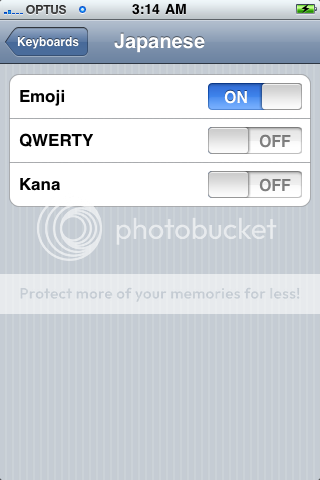
All you need to do is tap the globe icon to the left of the space bar to see the Japanese icons.

You can delete the Spell Number App if you don’t want to keep it anymore. Your Emoji keyboard will still be there :)
Wednesday, June 24, 2009
Q: Where to get Pre-Paid iPhone 3GS in Australia? A: Vodafone!
You can find all the details here :) To start, outright prices are as follows:
8GB: $759
16GB: $929
32GB: $1129
The iPhone 3GS will be locked to Vodafone with the unlocking fees being as follows:
| If iPhone is | And | Then charge is |
| Less than 6 months old | Unlock is via self-service on website | $75 dollars |
| Customer care completes unlock request | $100 dollars | |
| Older than 6 months | Unlock is via self-service on website | $25 dollars |
| Customer care completes unlock request | $50 dollars |
For more on unlocking iPhone on Vodafone, go here:
More details on the vodafone prepaid deal, here:
http://www.lifehacker.com.au/2009/06/vodafone-iphone-3gs-pricing-has-prepaid-tether-bundles/
Official Vodaphone Pre-Paid Prices are here:
http://www.vodafone.com.au/personal/iphone/3gspricing/index.htm
http://www.lifehacker.com.au/2009/06/vodafone-iphone-3gs-pricing-has-prepaid-tether-bundles/
Official Vodaphone Pre-Paid Prices are here:
http://www.vodafone.com.au/personal/iphone/3gspricing/index.htm
For store locations, visit:
Sunday, June 14, 2009
iPhone 7A341 Jailbreak?
The quick answer is NOT YET!
We will let you know as soon as it is available. Our guess is about a week. Here are some links for you if you want more information on the matter:
http://www.ismashphone.com/2009/06/iphone-os-30-jailbreak-information.html
http://www.touchpodium.com/2009/06/14/final-iphone-os-30-jailbreak-information-not-available-yet/
We will let you know as soon as it is available. Our guess is about a week. Here are some links for you if you want more information on the matter:
http://www.ismashphone.com/2009/06/iphone-os-30-jailbreak-information.html
http://www.touchpodium.com/2009/06/14/final-iphone-os-30-jailbreak-information-not-available-yet/
iPhone 3GS release dates for your country
June 19:
Canada
France
Germany
Italy
Spain
Switzerland
United Kingdom
United States
June 26:
Australia
Austria
Belgium
Ireland
Japan
Netherlands
July:
Bulgaria
Colombia
Croatia
Czech Republic
Denmark
Dominican Republic
El Salvador
Estonia
Finland
Greece
Guatemala
Hong Kong
Hungary
Latvia
Liechtenstein
Lithuania
Luxembourg
Macedonia
Malaysia
Malta
Mexico
Moldova
Montenegro
New Zealand
Norway
Philippines
Poland
Portugal
Romania
Singapore
Slovakia
South Africa
Sweden
Uruguay
August:
Argentina
Botswana
Brazil
Cameroon
Central African Republic
Chile
Ecuador
Egypt
Guinea
Honduras
India
Indonesia
Ivory Coast
Jamaica
Jordan
Kenya
Madagascar
Mali
Mauritius
Nicaragua
Niger
Panama
Paraguay
Peru
Russia
Saudi Arabia
Senegal
Taiwan
Thailand
Turkey
United Arab Emirates
Venezuela
Canada
France
Germany
Italy
Spain
Switzerland
United Kingdom
United States
June 26:
Australia
Austria
Belgium
Ireland
Japan
Netherlands
July:
Bulgaria
Colombia
Croatia
Czech Republic
Denmark
Dominican Republic
El Salvador
Estonia
Finland
Greece
Guatemala
Hong Kong
Hungary
Latvia
Liechtenstein
Lithuania
Luxembourg
Macedonia
Malaysia
Malta
Mexico
Moldova
Montenegro
New Zealand
Norway
Philippines
Poland
Portugal
Romania
Singapore
Slovakia
South Africa
Sweden
Uruguay
August:
Argentina
Botswana
Brazil
Cameroon
Central African Republic
Chile
Ecuador
Egypt
Guinea
Honduras
India
Indonesia
Ivory Coast
Jamaica
Jordan
Kenya
Madagascar
Mali
Mauritius
Nicaragua
Niger
Panama
Paraguay
Peru
Russia
Saudi Arabia
Senegal
Taiwan
Thailand
Turkey
United Arab Emirates
Venezuela
How to Force Quit Applications in iPhone 3.0 and iPhone 3GS
To force quit an application in 3.0, press and hold the sleep/wake button until the slide to power off screen appears, then press and hold the home button until the application quits (about six seconds).
Link:
http://www.iphonedownloadblog.com/2009/06/13/force-quit-iphone-30/
Link:
http://www.iphonedownloadblog.com/2009/06/13/force-quit-iphone-30/
Subscribe to:
Comments (Atom)


 Posts
Posts


