Showing posts with label Applications. Show all posts
Showing posts with label Applications. Show all posts
Thursday, December 17, 2009

Thursday, October 15, 2009
iPhone Controlled Car - Minivan
iDriver is an iPhone application to remote control a car. It is equipped with various sensors and a drive-by-wire system for unmanned driving. iDriver is an addon to remote control the car with an iPhone. Powered by Appirion UG (http://www.appirion.com).
For further information please visit the official website of the autonomous vehicle at:
http://robotics.mi.fu-berlin.de/pmwiki/pmwiki.php
Or go to http://www.spiritofberlin.eu for more information on "Spirit of Berlin", a completely autonomous vehicle by the Freie Universität Berlin.
Wednesday, October 14, 2009
Tuesday, October 13, 2009
Start Your Car With Your iPhone
For more information visit:
http://news.cnet.com/8301-27076_3-10373014-248.html
To buy or upgrade your viper system to support smart start, please visit viper's website:
http://www.viper.com/smartstart/
Friday, September 25, 2009
Sunday, August 16, 2009
The 35 Best iPhone Apps Of The Year - Washington Post
This list was composed by Alex Ahlund, founder of AppVee. Here are some of my favorites:
- Hey Where Are You (free): tell people where you are. Supports Push technology.
- TweetDeck (free): Twitter client.
- Mover (free): file swapping over wireless.
- Simplify Music 2: Stream music from your PC seamlessly.
- Photogene: edit photos right from your iPhone.
- QuickOffice: Mobile Office Suite for the iPhone.
Games:
- Pocket God
- Doodle jump
- Oregon Trail
- Peggle
For the full list, go to:
http://www.washingtonpost.com/wp-dyn/content/article/2009/08/16/AR2009081600099.html
- Hey Where Are You (free): tell people where you are. Supports Push technology.
- TweetDeck (free): Twitter client.
- Mover (free): file swapping over wireless.
- Simplify Music 2: Stream music from your PC seamlessly.
- Photogene: edit photos right from your iPhone.
- QuickOffice: Mobile Office Suite for the iPhone.
Games:
- Pocket God
- Doodle jump
- Oregon Trail
- Peggle
For the full list, go to:
http://www.washingtonpost.com/wp-dyn/content/article/2009/08/16/AR2009081600099.html
Thursday, August 13, 2009
148Apps.com: Top iPhone Applications and Games
The purpose of 148Apps.com is to provide reviews and rankings for iPhone and iPod Touch applications. The goal of the site is to sort through the best of the best of apps and provide that information in a concise manner.
The top app rankings are here:
http://www.148apps.com/top-100-iphone-applications-lists/
Visit them at:
http://www.148apps.com/
The top app rankings are here:
http://www.148apps.com/top-100-iphone-applications-lists/
Visit them at:
http://www.148apps.com/
Tuesday, June 30, 2009
How to Enable Emoji Icons On iPhone OS 3.0 and iPhone 3GS
Here are the steps:
1. go to the App Store and download "Spell Number":

2. Launch the app and type 91929394.59

3. Press the home button
4. Go to Settings > General > Keyboard > International Keyboards > Japanese. Then turn “Emoji” to "ON".
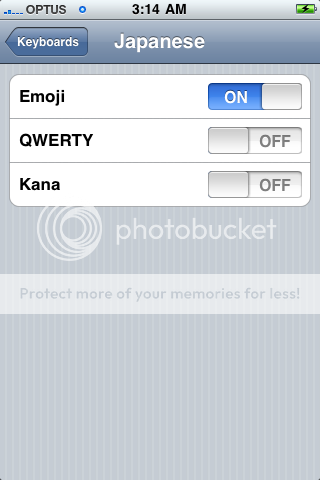
All you need to do is tap the globe icon to the left of the space bar to see the Japanese icons.

You can delete the Spell Number App if you don’t want to keep it anymore. Your Emoji keyboard will still be there :)
Sunday, June 21, 2009
MobileInstallation Patch For iPhone 3.0 (7A341)
Here is where you can get the file:
http://www.iphonedownloadblog.com/2009/06/20/mobileinstallation-iphone-30/
Alternatively, go to Cydia and add the following source: http://cydia.hackulo.us.
Then install the application called AppSync. This will patch your MobileInstallation file.
http://www.iphonedownloadblog.com/2009/06/20/mobileinstallation-iphone-30/
Alternatively, go to Cydia and add the following source: http://cydia.hackulo.us.
Then install the application called AppSync. This will patch your MobileInstallation file.
Sunday, June 14, 2009
How to Force Quit Applications in iPhone 3.0 and iPhone 3GS
To force quit an application in 3.0, press and hold the sleep/wake button until the slide to power off screen appears, then press and hold the home button until the application quits (about six seconds).
Link:
http://www.iphonedownloadblog.com/2009/06/13/force-quit-iphone-30/
Link:
http://www.iphonedownloadblog.com/2009/06/13/force-quit-iphone-30/
Sunday, May 17, 2009
How To Install Mame Emulator & Roms Arcade For 2.2.1 iPhone,iPhone 3G & iPod Touch
Download (Mame4iphone) in Cydia and follow video:
Also, visit the video author's blog and donate to him:
http://123locker.com/blog/
Also, visit the video author's blog and donate to him:
http://123locker.com/blog/
Wednesday, April 29, 2009
Video: iPhone Apps for beginners
iPhone Apps for beginners shows some of the most popular iPhone Applications for newbies:
http://site.btcalgary.ca/video/?bcpid=5173168001&bclid=5184558001&bctid=21516298001
http://site.btcalgary.ca/video/?bcpid=5173168001&bclid=5184558001&bctid=21516298001
Thursday, January 22, 2009
TV Out Options for your iPhone
Here are the Options:
Option 1: The TVOut project
Live TV Out from iPhone from Ars Technica on Vimeo.
Option 2: Screensplitr
Both options can be installed via Cydia on your jailbroken iPhone.
Option 1: The TVOut project
Live TV Out from iPhone from Ars Technica on Vimeo.
Option 2: Screensplitr
Both options can be installed via Cydia on your jailbroken iPhone.
Subscribe to:
Posts (Atom)


 Posts


