No baseband upgrade for this release which means that you will NOT loose your unlock abilities if you upgrade your iphone via the Pwnage tool. Here are the details and screen shot of the step by step tutorial by BigBoss:
http://thebigboss.org/guides/pwnage-20-guide/
The official website of the devteam and important instructions can be found here:
http://blog.iphone-dev.org/post/211802082/pwnage-pie
Instructions from iClarified including video:
http://www.iclarified.com/entry/index.php?enid=4254
Thanx Sheikh :)
Showing posts with label iPhone 3GS. Show all posts
Showing posts with label iPhone 3GS. Show all posts
Tuesday, October 13, 2009

Monday, September 28, 2009
Friday, September 25, 2009
Thursday, September 24, 2009
Speck PixelSkin Quick Review
A quick review of the iPhone 3G Case from Speck called Pixel Skin. Three colors are shown: yellow, white and green.
Product Page:
http://www.speckproducts.com/products/pixelskin/iphone-3g/143
Saturday, September 19, 2009
UPDATED: How to jailbreak new iPhone 3GS (step by step)
- first, download and install iTunes on your pc or mac:
http://www.apple.com/itunes/download/
- Download iPhone 3GS firmware 3.0.1 from here:
http://appldnld.apple.com.edgesuite.net/content.info.apple.com/iPhone/061-6976.20090731.Vgbt5/iPhone2,1_3.0.1_7A400_Restore.ipsw
- connect your iphone to iTunes.
- update to iphone 3.0.1 in iTunes: Start iTunes then connect your phone via USB. Then WHILE HOLDING DOWN THE "SHIFT" KEY, press the "update" button in iTunes. Select the file you downloaded above: "iPhone2,1_3.0.1_7A400_Restore.ipsw"
- Download:
- Redsnow:
http://thebigboss.org/hostedfiles/redsn0w-win_0.8.zip
- iPhone firmware 3.0:
http://appldnld.apple.com.edgesuite.net/content.info.apple.com/iPhone/061-6582.20090617.LlI87/iPhone2,1_3.0_7A341_Restore.ipsw
- Run redsn0w
- Click browse
- Select the 3.0 firmware file you downloaded "iPhone2,1_3.0_7A341_Restore.ipsw"
- Click next.
- Select Cydia (not icy)
- Follow on screen instructions.
- iPhone will reboot Jailbroken. You will see a brown Cydia icon on your second screen.
http://www.apple.com/itunes/download/
- Download iPhone 3GS firmware 3.0.1 from here:
http://appldnld.apple.com.edgesuite.net/content.info.apple.com/iPhone/061-6976.20090731.Vgbt5/iPhone2,1_3.0.1_7A400_Restore.ipsw
- connect your iphone to iTunes.
- update to iphone 3.0.1 in iTunes: Start iTunes then connect your phone via USB. Then WHILE HOLDING DOWN THE "SHIFT" KEY, press the "update" button in iTunes. Select the file you downloaded above: "iPhone2,1_3.0.1_7A400_Restore.ipsw"
- Download:
- Redsnow:
http://thebigboss.org/hostedfiles/redsn0w-win_0.8.zip
- iPhone firmware 3.0:
http://appldnld.apple.com.edgesuite.net/content.info.apple.com/iPhone/061-6582.20090617.LlI87/iPhone2,1_3.0_7A341_Restore.ipsw
- Run redsn0w
- Click browse
- Select the 3.0 firmware file you downloaded "iPhone2,1_3.0_7A341_Restore.ipsw"
- Click next.
- Select Cydia (not icy)
- Follow on screen instructions.
- iPhone will reboot Jailbroken. You will see a brown Cydia icon on your second screen.
Saturday, August 22, 2009
How to jailbreak new iPhone 3GS (step by step)
UPDATED: Go here for updated version:
http://www.modiphone.com/2009/09/updated-how-to-jailbreak-new-iphone-3gs.html
http://www.modiphone.com/2009/09/updated-how-to-jailbreak-new-iphone-3gs.html
- first, download and install itunes on your pc or mac:
http://www.apple.com/itunes/download/
- connect your iphone to iTunes.
- update to iphone 3.0.1 in iTunes.
- Download:
- Redsnow:
http://thebigboss.org/hostedfiles/redsn0w-win_0.8.zip
- iPhone firmware 3.0:
http://appldnld.apple.com.edgesuite.net/content.info.apple.com/iPhone/061-6582.20090617.LlI87/iPhone2,1_3.0_7A341_Restore.ipsw
- Run redsn0w
- Click browse
- Select the 3.0 firmware file you downloaded "iPhone2,1_3.0_7A341_Restore.ipsw"
- Click next.
- Select Cydia (not icy)
- Follow on screen instructions.
- iPhone will reboot Jailbroken. You will see a brown Cydia icon on your second screen.
Sunday, August 16, 2009
The 35 Best iPhone Apps Of The Year - Washington Post
This list was composed by Alex Ahlund, founder of AppVee. Here are some of my favorites:
- Hey Where Are You (free): tell people where you are. Supports Push technology.
- TweetDeck (free): Twitter client.
- Mover (free): file swapping over wireless.
- Simplify Music 2: Stream music from your PC seamlessly.
- Photogene: edit photos right from your iPhone.
- QuickOffice: Mobile Office Suite for the iPhone.
Games:
- Pocket God
- Doodle jump
- Oregon Trail
- Peggle
For the full list, go to:
http://www.washingtonpost.com/wp-dyn/content/article/2009/08/16/AR2009081600099.html
- Hey Where Are You (free): tell people where you are. Supports Push technology.
- TweetDeck (free): Twitter client.
- Mover (free): file swapping over wireless.
- Simplify Music 2: Stream music from your PC seamlessly.
- Photogene: edit photos right from your iPhone.
- QuickOffice: Mobile Office Suite for the iPhone.
Games:
- Pocket God
- Doodle jump
- Oregon Trail
- Peggle
For the full list, go to:
http://www.washingtonpost.com/wp-dyn/content/article/2009/08/16/AR2009081600099.html
Tuesday, August 4, 2009
How To Guide To Update and Jailbreak iPhone 3G 3GS and 2G iPhone and All iPod Touch Versions
Here is the video:
And here are the links and information:
Redsn0w v0.8:
http://thebigboss.org/hostedfiles/redsn0w-win_0.8.zip
Select and download 3.0, NOT 3.0.1 firmware for your device. This is needed by Redsn0w to jailbreak your device:
http://www.felixbruns.de/iPod/firmware/
ONLY if you have iPhone 2G: Download bootloaders for unlocking iPhone 2G: http://www.mediafire.com/?9mdezqi2jem
Add this source to Cydia to unlock your iPhone 3G or 3GS and install Ultrasn0w: repo666.ultrasn0w.com
Written instructions:
http://www.iphoneinquirer.com/2009/07/how-to-unlock-and-jailbreak-firmware.html
Credit for this video and links goes to: iPhone Inquirer. Thanks :)
You can visit his website to get all these download links and more:
http://www.iphoneinquirer.com/2009/07/downloads.html
And here are the links and information:
Redsn0w v0.8:
http://thebigboss.org/hostedfiles/redsn0w-win_0.8.zip
Select and download 3.0, NOT 3.0.1 firmware for your device. This is needed by Redsn0w to jailbreak your device:
http://www.felixbruns.de/iPod/firmware/
ONLY if you have iPhone 2G: Download bootloaders for unlocking iPhone 2G: http://www.mediafire.com/?9mdezqi2jem
Add this source to Cydia to unlock your iPhone 3G or 3GS and install Ultrasn0w: repo666.ultrasn0w.com
Written instructions:
http://www.iphoneinquirer.com/2009/07/how-to-unlock-and-jailbreak-firmware.html
Credit for this video and links goes to: iPhone Inquirer. Thanks :)
You can visit his website to get all these download links and more:
http://www.iphoneinquirer.com/2009/07/downloads.html
Thursday, July 30, 2009
How to sync your iPhone with Google Calendar and Contacts (includes iCal instructions)
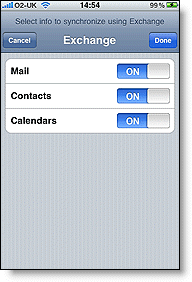
It does not require MobileMe. Google Sync does the job :) To set it up go here:
http://www.google.com/support/mobile/bin/answer.py?answer=138740&topic=14252
It does not conflict with MobileMe as far as I know... I tried it :) There are however some known issues but they are minor:
http://www.google.com/support/calendar/bin/answer.py?answer=99360
Want to synctonize iCal as well? Click the link below for more:
http://www.google.com/support/calendar/bin/answer.py?answer=99358#ical
Enjoy your (automatically) perfectly synchronized life :P
Subscribe to:
Posts (Atom)


 Posts
Posts


