- first, download and install iTunes on your pc or mac:
http://www.apple.com/itunes/download/
- Download iPhone 3GS firmware 3.0.1 from here:
http://appldnld.apple.com.edgesuite.net/content.info.apple.com/iPhone/061-6976.20090731.Vgbt5/iPhone2,1_3.0.1_7A400_Restore.ipsw
- connect your iphone to iTunes.
- update to iphone 3.0.1 in iTunes: Start iTunes then connect your phone via USB. Then WHILE HOLDING DOWN THE "SHIFT" KEY, press the "update" button in iTunes. Select the file you downloaded above: "iPhone2,1_3.0.1_7A400_Restore.ipsw"
- Download:
- Redsnow:
http://thebigboss.org/hostedfiles/redsn0w-win_0.8.zip
- iPhone firmware 3.0:
http://appldnld.apple.com.edgesuite.net/content.info.apple.com/iPhone/061-6582.20090617.LlI87/iPhone2,1_3.0_7A341_Restore.ipsw
- Run redsn0w
- Click browse
- Select the 3.0 firmware file you downloaded "iPhone2,1_3.0_7A341_Restore.ipsw"
- Click next.
- Select Cydia (not icy)
- Follow on screen instructions.
- iPhone will reboot Jailbroken. You will see a brown Cydia icon on your second screen.
Showing posts with label iTunes. Show all posts
Showing posts with label iTunes. Show all posts
Saturday, September 19, 2009

Saturday, August 22, 2009
How to jailbreak new iPhone 3GS (step by step)
UPDATED: Go here for updated version:
http://www.modiphone.com/2009/09/updated-how-to-jailbreak-new-iphone-3gs.html
http://www.modiphone.com/2009/09/updated-how-to-jailbreak-new-iphone-3gs.html
- first, download and install itunes on your pc or mac:
http://www.apple.com/itunes/download/
- connect your iphone to iTunes.
- update to iphone 3.0.1 in iTunes.
- Download:
- Redsnow:
http://thebigboss.org/hostedfiles/redsn0w-win_0.8.zip
- iPhone firmware 3.0:
http://appldnld.apple.com.edgesuite.net/content.info.apple.com/iPhone/061-6582.20090617.LlI87/iPhone2,1_3.0_7A341_Restore.ipsw
- Run redsn0w
- Click browse
- Select the 3.0 firmware file you downloaded "iPhone2,1_3.0_7A341_Restore.ipsw"
- Click next.
- Select Cydia (not icy)
- Follow on screen instructions.
- iPhone will reboot Jailbroken. You will see a brown Cydia icon on your second screen.
Sunday, August 16, 2009
The 35 Best iPhone Apps Of The Year - Washington Post
This list was composed by Alex Ahlund, founder of AppVee. Here are some of my favorites:
- Hey Where Are You (free): tell people where you are. Supports Push technology.
- TweetDeck (free): Twitter client.
- Mover (free): file swapping over wireless.
- Simplify Music 2: Stream music from your PC seamlessly.
- Photogene: edit photos right from your iPhone.
- QuickOffice: Mobile Office Suite for the iPhone.
Games:
- Pocket God
- Doodle jump
- Oregon Trail
- Peggle
For the full list, go to:
http://www.washingtonpost.com/wp-dyn/content/article/2009/08/16/AR2009081600099.html
- Hey Where Are You (free): tell people where you are. Supports Push technology.
- TweetDeck (free): Twitter client.
- Mover (free): file swapping over wireless.
- Simplify Music 2: Stream music from your PC seamlessly.
- Photogene: edit photos right from your iPhone.
- QuickOffice: Mobile Office Suite for the iPhone.
Games:
- Pocket God
- Doodle jump
- Oregon Trail
- Peggle
For the full list, go to:
http://www.washingtonpost.com/wp-dyn/content/article/2009/08/16/AR2009081600099.html
Thursday, July 30, 2009
How to sync your iPhone with Google Calendar and Contacts (includes iCal instructions)
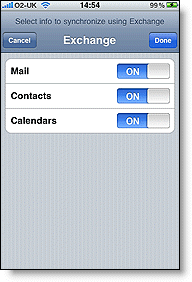
It does not require MobileMe. Google Sync does the job :) To set it up go here:
http://www.google.com/support/mobile/bin/answer.py?answer=138740&topic=14252
It does not conflict with MobileMe as far as I know... I tried it :) There are however some known issues but they are minor:
http://www.google.com/support/calendar/bin/answer.py?answer=99360
Want to synctonize iCal as well? Click the link below for more:
http://www.google.com/support/calendar/bin/answer.py?answer=99358#ical
Enjoy your (automatically) perfectly synchronized life :P
Saturday, January 31, 2009
Can't find iPhone restore file iTunes download location?
The location where iTunes saves its downloaded restore and update files is here:
PC:
C:\Documents and Settings\*** USER***\Application Data\Apple Computer\iTunes\iPhone Software Updates
Where ***USER*** is the user name of the login you are on.
You need to have hidden files showing... To do this, go to:
tools > folder options > view > un-check "hide hidden folders".
Mac:
Library > iTunes > iPhone software updates
You can also download the latest iPhone restore images from the link below:
http://www.iclarified.com/entry/index.php?enid=750
PC:
C:\Documents and Settings\*** USER***\Application Data\Apple Computer\iTunes\iPhone Software Updates
Where ***USER*** is the user name of the login you are on.
You need to have hidden files showing... To do this, go to:
tools > folder options > view > un-check "hide hidden folders".
Mac:
Library > iTunes > iPhone software updates
You can also download the latest iPhone restore images from the link below:
http://www.iclarified.com/entry/index.php?enid=750
Thursday, January 15, 2009
One iPhone, Two Computers, Many Solutions
The guide can be found here:
http://reviews.cnet.com/8301-19512_7-10142345-233.html?part=rss&tag=feed&subj=iPhoneAtlas
Alternatively, you can try the Cydia App SwapTunes. The guide for that is here:
http://reviews.cnet.com/8301-19512_7-10115100-233.html?tag=mncol;title
I know that you like videos better, so here is a how-to video:
http://reviews.cnet.com/8301-19512_7-10142345-233.html?part=rss&tag=feed&subj=iPhoneAtlas
Alternatively, you can try the Cydia App SwapTunes. The guide for that is here:
http://reviews.cnet.com/8301-19512_7-10115100-233.html?tag=mncol;title
I know that you like videos better, so here is a how-to video:
Subscribe to:
Posts (Atom)


 Posts


